How to replace the Toner Cartridge

How do I replace the Print Cartridge?
WARNING
- Do not incinerate toner (new or used) or toner containers. Doing so risks burns. Toner will ignite on contact with naked flame.
- Do not store toner (new or used) or toner containers anywhere near naked flames. Doing so risks fire and burns. Toner will ignite on contact with naked flame.
- Do not use a vacuum cleaner to remove spilled toner (including used toner). Absorbed toner may cause a fire or explosion due to electrical contact flickering inside the vacuum cleaner. However, it is possible to use a vacuum cleaner that is explosion-proof and dust ignition-proof. If toner is spilled on the floor, remove the spilled toner slowly using a wet cloth, so that the toner is not scattered.
- The following explains the warning messages on the plastic bag used in this product's packaging.
- Keep the polythene materials (bags, etc.) supplied with this machine away from babies and small children at all times. Suffocation can result if polythene materials are brought into contact with the mouth or nose.
CAUTION
- Do not crush or squeeze toner containers. Doing so can cause toner spillage, possibly resulting in dirtying of skin, clothing, and floor, and accidental ingestion.
- Store toner (new or used), toner containers, and components that have been in contact with toner out of reach of children.
- If toner or used toner is inhaled, gargle with plenty of water and move into a fresh air environment. Consult a doctor if necessary.
- If toner or used toner gets into your eyes, flush immediately with large amounts of water. Consult a doctor if necessary.
- If toner or used toner is swallowed, dilute by drinking a large amount of water. Consult a doctor if necessary.
- When removing jammed paper or replacing toner, avoid getting toner (new or used) on your clothing. If toner comes into contact with your clothing, wash the stained area with cold water. Hot water will set the toner into the fabric and make removing the stain impossible.
- When removing jammed paper or replacing toner, avoid getting toner (new or used) on your skin. If toner comes into contact with your skin, wash the affected area thoroughly with soap and water.
- When replacing a toner or waste toner container or consumables with toner, make sure that the toner does not splatter. Put the waste consumables in a bag after they are removed. For consumables with a lid, make sure that the lid is shut.
Important
- Always replace the toner cartridge when a notification appears on the device.
- Fault may occur if you use toner other than the recommended type.
- When adding toner, do not turn off the main power. If you do, settings will be lost.
- Store toner where it will not be exposed to direct sunlight, temperatures above 35°C (95°F), or high humidity.
- Store toner horizontally.
- Do not shake the toner cartridge with its mouth down after removing it. Residual toner may scatter.
- Do not repeatedly install and remove toner cartridges. This will result in toner leakage.
To replace the toner cartridge, follow these steps.
-
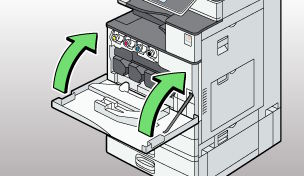
Open the front cover.
-
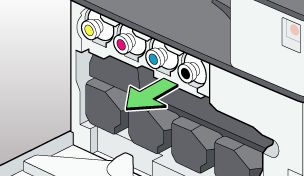
Pull out the empty toner bottle carefully.
From the right, the bottle cartridges are installed in the order of black (K), cyan (C), magenta (M) and yellow (Y).

-
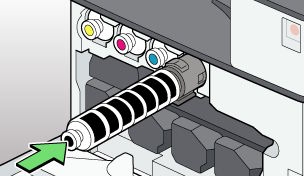
Take the new bottle out of the box and shake it for seven or eight times.


-
Remove the bottle cap and insert it gently to the direction shown below until it locks.

-
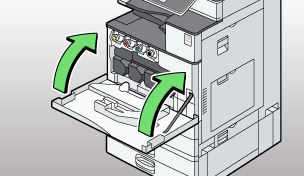
Push up the front cover until it closes.

Note
- The appearance and labels of toner bottles is subject to change from time to time without notice. The difference does not affect the quality.
- Replace the toner cartridge according to the device. Check the type if you are unsure. For detail, see "Consumables".
- If "Toner Cartridge is almost empty." appears, the toner has almost run out. Have a replacement toner cartridge at hand.
- If appears when there is a lot of toner, follow the toner replacement instructions that appear on the screen. Pull out the cartridge, and then reinstall it.
- You can check the name of the required toner and the replacement procedure using the [Add Toner] screen.
-
0
Please sign in to leave a comment.
Comments
0 comments